

Odoo is an ERP system with modular architecture that allows businesses to implement only the functions they truly need. Instead of purchasing a massive "all in one" system, You can start with one or two modules and gradually expand functionality as your business grows.
In this article, we'll provide a detailed look at three key Odoo modules that form the foundation for most companies:
01

CRM (Customer Relationship Management) — sales and customer management
02

Inventory (Inventory & Warehouse Management) — stock and logistics management
03

Finance (Accounting & Finance) — accounting and financial management
Each module can be used independently or integrated with others, creating a unified business management system.
Odoo CRM: Sales and Customer Management Module
What's Included in the Odoo CRM Module
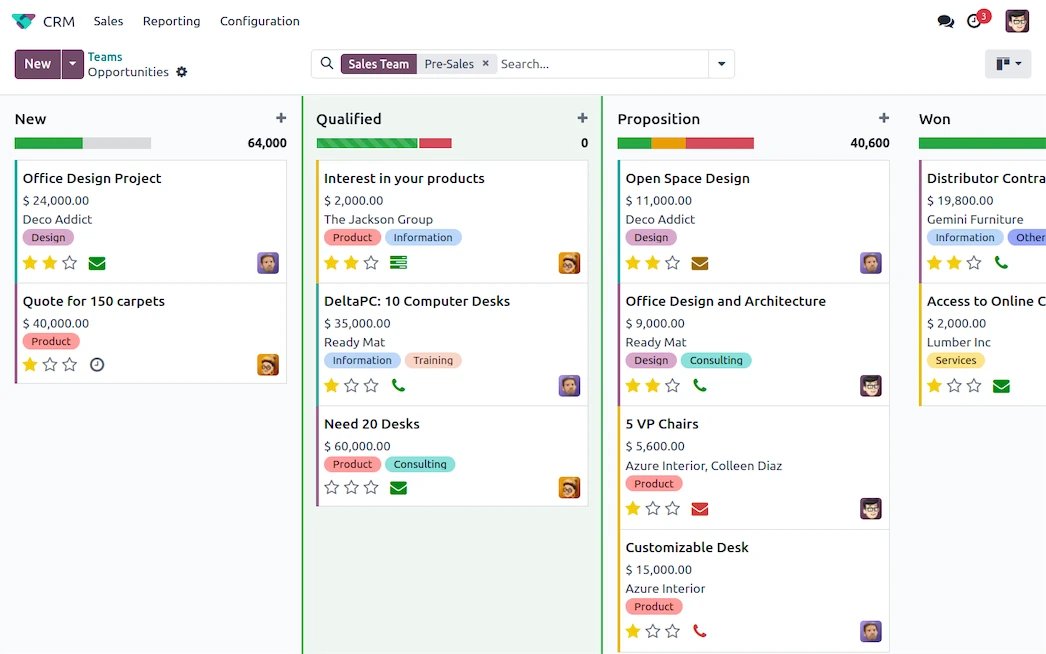
Odoo's CRM module is a powerful AI-powered tool for automating the sales process from first customer contact to deal closure. Here's what its functionality includes:
1. Lead and Opportunity Management
- Automatic lead capture from web forms, email, social media
- Lead classification by custom criteria
- Sales funnel with stage visualization
- Revenue forecasting based on deal closing probability
2. Customer Database Management
- Unified contact and company database
- History of all interactions: calls, emails, meetings
- Customer segmentation by various parameters
- Tags and custom fields for flexible qualification
3. Activities and Tasks
- Automatic scheduling of calls, meetings, emails
- Reminders and deadlines
- Task delegation between managers
- Calendar with Google Calendar / Outlook integration
4. Analytics and Reporting
- Dashboard with key sales metrics
- Conversion analysis at each funnel stage
- Manager performance comparison
- Revenue forecast by periods
5. Email Marketing Automation
- Mass mailings with personalization
- Email templates for different scenarios
- Open and click tracking
- A/B testing (in combination with Email Marketing module)
6. Integration with Other Modules
- Sales — automatic creation of quotations
- Website — lead capture from site forms
- Email — integration of all correspondence in CRM
- VoIP — call recording and automatic logging
Who Odoo CRM Is Suited For
Ideal for:
- B2B companies with sales cycles from several days to several months
- Wholesalers with large numbers of clients and deals
- Service companies (consulting, IT, marketing) requiring project history tracking
- Distributors with extensive manager networks
Less suitable for:
- Retail stores with instant sales
- B2C e-commerce without personalized sales
- Companies with a single product and standard sales process
Odoo CRM Use Cases
Example 1: ERP Implementation IT Company
The company receives leads from website, conferences, and referrals. Managers:
- Qualify leads by budget and urgency
- Conduct demo presentations (recorded in CRM as meetings)
- Send quotations (automatically generated from CRM)
- Track deal status in funnel: Qualification → Needs Analysis → Proposal → Negotiation → Signing
CRM automatically reminds about follow-up calls and displays quarterly revenue forecast.
Example 2: Wholesale Building Materials Supplier
Works with a network of construction companies:
- Database contains 500+ clients with order history
- Managers receive reminders to contact clients (based on average order frequency)
- Customer segmentation by purchase volume: VIP, standard, new
- Mass mailings with new items and promotions
Example 3: Digital Marketing Agency
Uses CRM to work with potential and current clients:
- Leads come from contextual advertising and organic search
- Automatic qualification by budget and industry
- Templates for different client types: e-commerce, B2B SaaS, offline business
- After deal closure, data transfers to "Projects" module for campaign work
Odoo CRM Advantages vs. Competitors
✅ Free Community version with basic CRM functionality
✅ Integration with entire Odoo ecosystem (inventory, finance, manufacturing)
✅ Flexible customization of fields, funnel stages, automations
✅ No user limits in Enterprise (unlike Salesforce)
✅ Ukrainian interface localization
Would you like to learn more and give Odoo a try?
Briefly describe your business and goals. We will get back to you within 24 hours.
Odoo Inventory: Stock and Logistics Management Module
What's Included in the Odoo Inventory Module
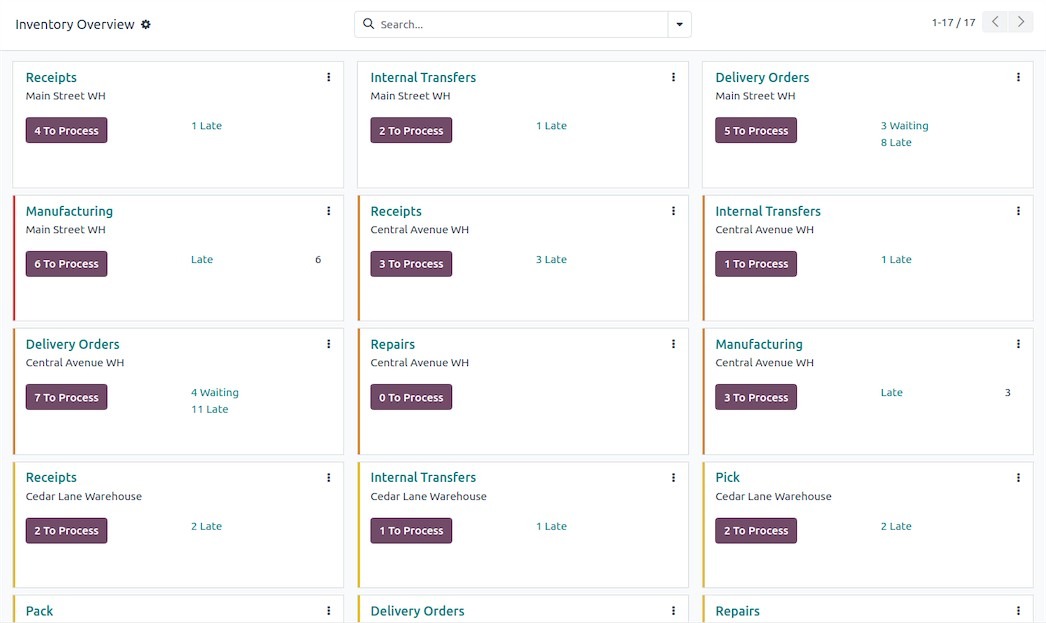
The "Inventory" module in Odoo is a comprehensive solution for inventory management, warehouse logistics, and supply chains. It covers the entire cycle from product procurement to customer shipment.
1. Inventory Management
- Real-time product tracking
- Multi-warehouse operation (unlimited warehouses)
- Serial numbers and lot tracking
- Expiration dates for time-limited goods
- "On hand," "reserved," "available for sale" quantities
- Reservation strategies: FIFO, LIFO, FEFO
2. Warehouse Operations
- Goods receipt (purchase orders → receipts)
- Shipments (sales orders → delivery orders)
- Internal transfers between warehouses and locations
- Inventory with cycle counting support
- Stock adjustments with justification
- Barcode scanning for quick processing
3. Routing and Locations
- Multi-level warehouse structure: warehouse → zones → racks → shelves
- Automatic routing rules (e.g., put-away strategies)
- Receiving, storage, packing, shipping zones
- Warehouse worker path optimization (wave picking)
4. Replenishment Strategies
- Automatic purchase requests when reaching minimum stock
- Reordering Rules
- Demand forecasting based on history
- Order size optimization (EOQ)
5. Traceability and Quality
- Full lot traceability from supplier to customer
- Quality control on receipt (optionally through Quality module)
- Returns and claims management
- Stock movement reports
6. Integrations
- Purchase — automatic supplier order creation
- Sales — stock reservation for orders
- Manufacturing — raw material consumption and finished goods receipt
- E-commerce — inventory synchronization with online store
- Point of Sale (POS) — write-offs for retail sales
Who Odoo Inventory Is Suited For
Ideal for:
- Wholesale distributors with large product nomenclature
- Manufacturing companies with raw material and finished goods inventory
- Retail chains with central warehouse and stores
- E-commerce with fulfillment centers
- Importers requiring lot and serial number traceability
Less suitable for:
- Service companies without physical goods
- Micro-businesses with 10-20 SKUs (too complex)
- Dropshipping without own warehouse
Odoo Inventory Use Cases
Example 1: Children's Toy Store Chain
Has central warehouse and 15 retail stores:
- Central warehouse receives goods from suppliers (imports from China, Europe)
- Automatic store replenishment based on sales history
- Inter-store transfers to balance popular items
- Monthly inventory from mobile devices (barcode scanning)
- POS synchronization — each store sale instantly writes off inventory
Example 2: Electronics Distributor with Warranty Service
Imports and sells household appliances:
- Serial number tracking for each item (refrigerators, washing machines)
- Traceability from supplier to end buyer for warranty cases
- Quality control on receipt (completeness check, visual inspection)
- Returns management — creating reverse logistics for defective goods
- Warranty claims reports with ability to submit supplier claims
Example 3: Food Products Manufacturer
Bakery with branded store network:
- FEFO strategy (First Expired, First Out) for perishable goods
- Automatic ingredient write-off during production (bread = flour + yeast + salt)
- Real-time stock control for fresh products
- Production optimization based on sales forecast
- Daily finished goods inventory with adjustment (natural shrinkage)
Odoo Inventory Advantages vs. Competitors
✅ Multi-warehouse architecture without additional licenses
✅ Unlimited locations within warehouses
✅ Support for complex logistics scenarios (cross-docking, dropshipping, JIT)
✅ Mobile app for warehouse workers with scanning support
✅ Integration with manufacturing (MRP) in one system
Would you like to learn more and give Odoo a try?
Briefly describe your business and goals. We will get back to you within 24 hours.
Odoo Finance: Accounting and Financial Management Module
What's Included in the Odoo Finance (Accounting) Module
The "Accounting" module in Odoo is a full-featured AI-powered accounting system that complies with international standards (IFRS, GAAP) and supports localizations for various countries, including Ukraine.
1. General Ledger and Entries
- Automatic accounting entries from other modules (sales, purchases, inventory)
- Manual journal entries
- Chart of accounts with analytical account support
- Multi-currency accounting with automatic NBU/ECB rates
- Period closings (lock dates)
2. Accounts Payable Management
- Vendor bill registration
- Payment schedules
- Partial payments and advances
- Supplier debt control
- Reconciliation statements with counterparties
3. Accounts Receivable Management
- Customer invoicing
- Automatic reminders for overdue payments
- Partial payments and prepayments
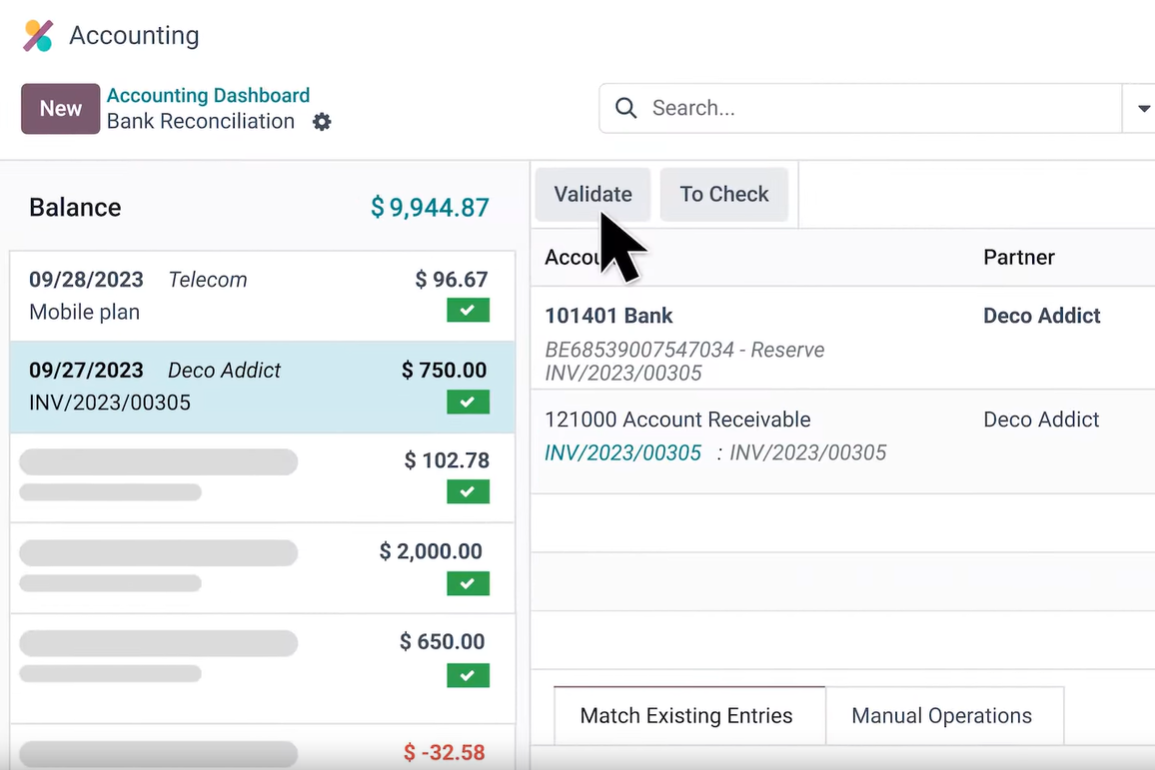
- Bank reconciliation
- Factoring and discounting
4. Banking Integration
- Automatic import of bank statements (CAMT, OFX, CSV)
- Automatic payment reconciliation with invoices (AI-matching)
- Outgoing payment register (payment orders)
- SEPA, SWIFT for international payments
- Multiple bank account management
5. Tax Accounting
- VAT: accrual, payment, reporting
- Tax declarations (depends on localization)
- Income tax with advance payments
- Other taxes: military levy, unified social contribution (for UA)
- Automatic tax calculation in documents
6. Analytical Accounting
- Accounting by projects, departments, expense categories
- Cost centers
- Overhead allocation
- Multi-dimensional profitability analysis
7. Financial Reporting
- Balance Sheet
- Profit and Loss Statement (P&L / Income Statement)
- Cash Flow Statement
- Statement of Changes in Equity
- Purchase and sales books (for VAT)
- Custom reports with builder
8. Asset Management
- Fixed assets accounting
- Depreciation by various methods (straight-line, accelerated, MACRS)
- Asset revaluation
- Disposal and liquidation
9. Budgeting
- Budget planning by accounts and analytics
- Budget execution control
- Actual/plan variance
- Approval and versioning
10. Integrations with Other Modules
- Sales → automatic customer invoices
- Purchase → automatic vendor bills
- Inventory → automatic inventory valuation (FIFO, AVCO, Standard Price)
- Payroll → salary and tax accrual
- Projects → analytical time and materials accounting
Who Odoo Finance Is Suited For
Ideal for:
- Small and medium enterprises (SME) with full accounting cycle
- International companies operating in multiple countries
- Holdings requiring consolidated reporting
- Companies with project accounting (construction, consulting, IT)
- E-commerce with automated invoicing and taxes
Less suitable for:
- Large corporations with very specific IFRS requirements (customization needed)
- Banks and financial institutions (specialized systems required)
- Companies fully outsourcing accounting (simpler systems sufficient)
Odoo Finance Use Cases
Example 1: IT Company with International Clients
Develops software for clients from Ukraine, EU, and MENA:
- Multi-currency accounting: invoices in USD, EUR, AED, receives in UAH
- Automatic exchange rates from NBU on transaction date
- Project analytics: separate accounting of costs and revenues for each project
- MOSS/OSS reporting for VAT on digital services in EU
- Cash flow forecast based on scheduled invoices and payment schedules
Example 2: Retail Chain with Franchise Outlets
15 owned stores + 10 franchise:
- Consolidated reporting across entire network
- Point-of-sale analytics — profitability of each store
- Royalty accounting from franchisees (% of revenue)
- POS integration — instant sales posting to accounting
- Daily cash flow from various outlets in unified dashboard
Example 3: Manufacturing Company with Exports
Produces furniture and exports to EU:
- Product cost accounting including raw materials, labor, overhead
- Automatic monthly equipment depreciation
- VAT accounting: domestic sales 20%, export 0% with confirmation
- Customs declarations and import duty accounting
- Transfer pricing documentation for related parties
- Budgeting: plan/actual by departments (workshop, warehouse, office, logistics)
Example 4: Online Store with Subscription (Subscription E-commerce)
Sells recurring-need products with subscription:
- Automatic monthly invoices according to subscription
- Deferred revenue for advance payments
- Automatic payment reconciliation from payment systems (Stripe, LiqPay)
- Recurring revenue analytics (MRR, ARR, churn rate)
- Tax reporting from e-commerce transactions
Odoo Finance Advantages vs. Competitors
✅ Full integration with sales, purchases, inventory — zero manual entry
✅ Localization for 100+ countries including Ukraine
✅ Multi-currency with automatic rates and revaluation
✅ Automatic bank reconciliation with AI-matching
✅ Unlimited companies in one database (for holdings)
✅ Analytical accounting of any complexity without extra fees
Module Integration: CRM + Inventory + Finance = Unified Ecosystem
Odoo's true power is revealed when you use multiple modules together. Here's how they interact:
Scenario 1: Lead to Cash
- CRM: Manager receives lead, qualifies it, conducts meeting
- CRM → Sales: Converts opportunity to quotation
- Sales → Inventory: After order confirmation, product reserved in warehouse
- Inventory: Warehouse worker ships goods, scans barcodes
- Sales → Accounting: Customer invoice automatically generated
- Accounting: After payment (bank statement) — automatic reconciliation and invoice closure
- CRM: Manager sales statistics updated automatically
Scenario 2: Procurement and Supply
- Inventory: System detects low stock (reordering rule)
- Purchase: Request for quotation (RFQ) automatically created
- Purchase: Manager confirms supplier order
- Inventory: Goods received in warehouse, serial number scanned
- Accounting: Vendor bill registered
- Accounting: Payment to supplier from bank statement
- Inventory → Accounting: Warehouse inventory cost updated (FIFO/AVCO)
Scenario 3: Project Business
- CRM: Lead converted to consulting services deal
- Sales: Order created with work description
- Project: Project with stages automatically created
- Timesheet: Team logs work hours by project
- Purchase: Materials/equipment purchased (if needed)
- Accounting: Invoice issued by stages (milestone billing)
- Accounting: Analytical reporting — project profitability (revenue - salary - materials)
How to Choose Which Modules to Start With
If you're a B2B company with sales:
- Start with: CRM → Sales → Accounting
- Then add: Inventory (when SKU count grows)
If you're retail:
- Start with: Inventory → POS → Accounting
- Then add: CRM (for wholesale clients), E-commerce
If you're manufacturing:
- Start with: Inventory → Manufacturing → Accounting
- Then add: Purchase, Sales, CRM
If you're a service company:
- Start with: CRM → Sales → Project → Accounting
- Then add: Timesheet, HR
If you're e-commerce:
- Start with: Website/E-commerce → Inventory → Accounting
- Then add: CRM (for email marketing), Sales (for B2B)
Conclusions: Which Odoo Modules to Choose for Your Business
Choose Odoo CRM if:
✅ You have a sales department with 2+ managers
✅ Sales cycle longer than 1 day
✅ Customer interaction history needed
✅ You want to automate follow-ups and forecasting
Choose Odoo Inventory if:
✅ Working with physical goods
✅ More than 100 SKUs in assortment
✅ Multiple warehouses or stores
✅ Lot/serial number traceability needed
Choose Odoo Finance if:
✅ Want to automate accounting
✅ Working with many counterparties and currencies
✅ Need accounting integration with operational processes
✅ Profitability analytics by projects/departments important
Best Implementation Strategy:
- Start with 1-2 critical modules (biggest pain points)
- Configure integration with current systems
- Train team (2-3 weeks for basic level)
- Launch with partner support
- Add modules gradually according to growing needs
Odoo is a constructor that grows with your business. Don't try to implement everything at once. Better to quality-configure 3 modules than superficially implement 10.